在Windows10上运行jekyll调试github pages
假设完全新的一个windows环境,以下在windows 10上安装
- 到官网(https://rubyinstaller.org/downloads/)下载ruby,并按安装包提示安装环境
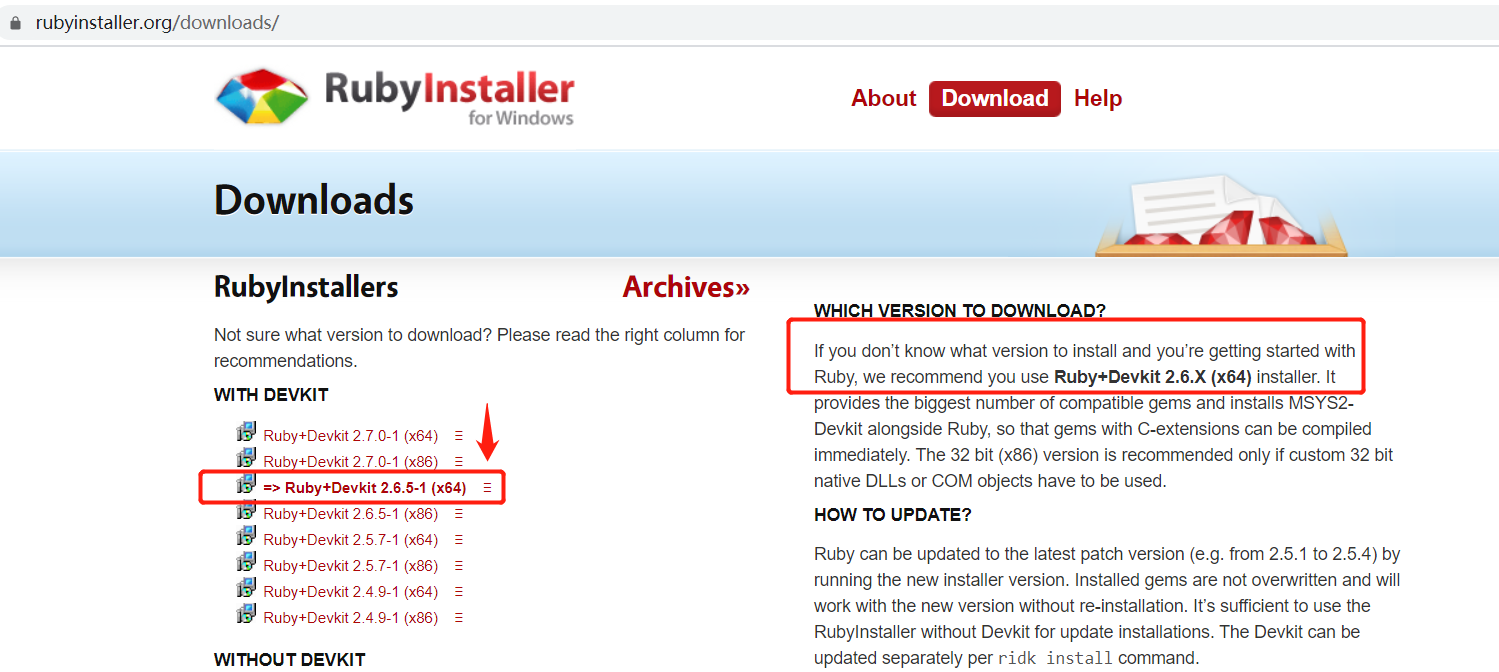
安装成功敲以下命令确认版本
c:\> ruby -v
ruby 2.6.5p114 (2019-10-01 revision 67812) [x64-mingw32]
2.安装bundle
c:\>gem install bundle
...

c:\>bundle -v
Bundler version 2.1.4
3.安装jekyll
c:\>gem install jekyll
...

c:\>jekyll -v
jekyll 4.0.0
4.创建项目
c:\>jekyll new abc
Running bundle install in C:/abc...
  Bundler: Fetching gem metadata from https://rubygems.org/...........
  Bundler: Fetching gem metadata from https://rubygems.org/.
  Bundler: Resolving dependencies...
  Bundler: Using public_suffix 4.0.3
  Bundler: Using addressable 2.7.0
  Bundler: Using bundler 2.1.4
  Bundler: Using colorator 1.1.0
  Bundler: Using concurrent-ruby 1.1.6
  Bundler: Using eventmachine 1.2.7 (x64-mingw32)
  Bundler: Using http_parser.rb 0.6.0
  Bundler: Using em-websocket 0.5.1
  Bundler: Using ffi 1.12.2 (x64-mingw32)
  Bundler: Using forwardable-extended 2.6.0
  Bundler: Using i18n 1.8.2
  Bundler: Using sassc 2.2.1 (x64-mingw32)
  Bundler: Using jekyll-sass-converter 2.1.0
  Bundler: Using rb-fsevent 0.10.3
  Bundler: Using rb-inotify 0.10.1
  Bundler: Using listen 3.2.1
  Bundler: Using jekyll-watch 2.2.1
  Bundler: Using kramdown 2.1.0
  Bundler: Using kramdown-parser-gfm 1.1.0
  Bundler: Using liquid 4.0.3
  Bundler: Using mercenary 0.3.6
  Bundler: Using pathutil 0.16.2
  Bundler: Using rouge 3.16.0
  Bundler: Using safe_yaml 1.0.5
  Bundler: Using unicode-display_width 1.6.1
  Bundler: Using terminal-table 1.8.0
  Bundler: Using jekyll 4.0.0
  Bundler: Fetching jekyll-feed 0.13.0
  Bundler: Installing jekyll-feed 0.13.0
  Bundler: Fetching jekyll-seo-tag 2.6.1
  Bundler: Installing jekyll-seo-tag 2.6.1
  Bundler: Fetching minima 2.5.1
  Bundler: Installing minima 2.5.1
  Bundler: Fetching thread_safe 0.3.6
  Bundler: Installing thread_safe 0.3.6
  Bundler: Fetching tzinfo 1.2.6
  Bundler: Installing tzinfo 1.2.6
  Bundler: Using tzinfo-data 1.2019.3
  Bundler: Fetching wdm 0.1.1
  Bundler: Installing wdm 0.1.1 with native extensions
  Bundler: Bundle complete! 6 Gemfile dependencies, 34 gems now installed.
  Bundler: Use `bundle info [gemname]` to see where a bundled gem is installed.
New jekyll site installed in C:/abc.
5.运行
c:\>cd abc
c:\abc>bundle exec jekyll serve
Configuration file: C:/_config.yml
            Source: C:/abc
       Destination: C:/abc/_site
 Incremental build: disabled. Enable with --incremental
      Generating...
       Jekyll Feed: Generating feed for posts
                    done in 0.692 seconds.
 Auto-regeneration: enabled for 'C:/abc'
    Server address: http://127.0.0.1:4000/
  Server running... press ctrl-c to stop.
6.浏览器访问 http://127.0.0.1:4000/
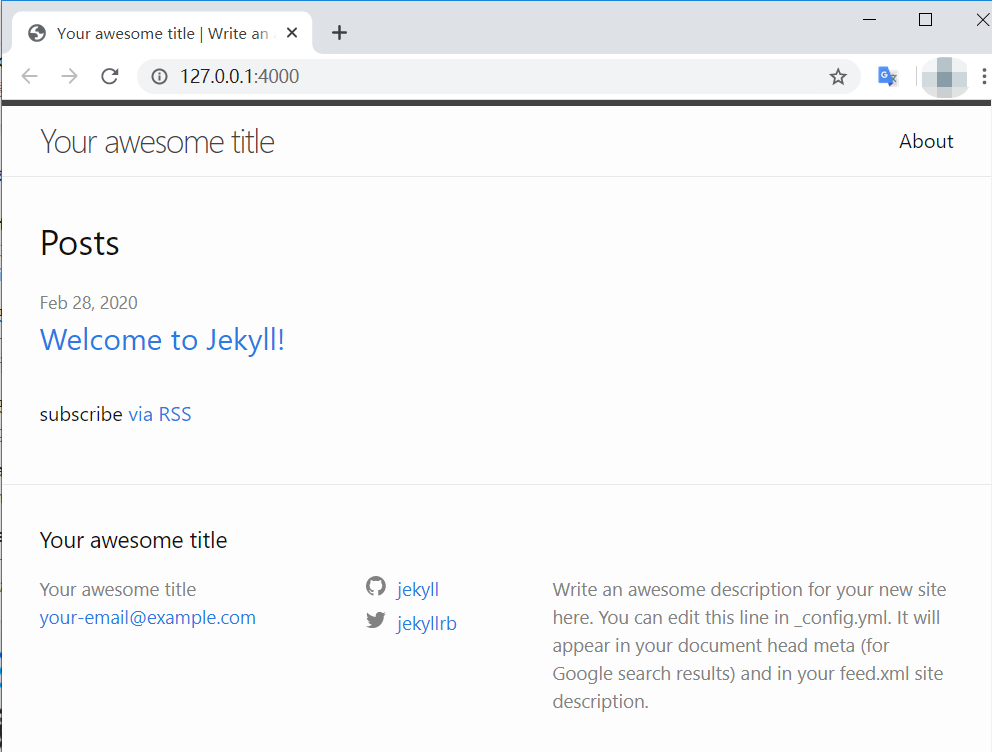
Tips: 中间遇到过一些问题解决方法 如果在之前已经已经上传过github pages,用的是旧版本jekyll生成的, 那么可能提示
C:/Ruby26-x64/lib/ruby/2.6.0/bundler/resolver.rb:287:in `block in verify_gemfile_dependencies_are_found!’: Could not find gem ‘tzinfo-data x64-mingw32’ in any of the gem sources listed in your Gemfile. (Bundler::GemNotFound)
那么可以用abc中新生成的Gemfile 和 Gemfile.lock替换即可。
参考网址: https://help.github.com/en/github/working-with-github-pages/creating-a-github-pages-site-with-jekyll https://jekyllrb.com/docs/installation/ https://help.github.com/en/github/working-with-github-pages/testing-your-github-pages-site-locally-with-jekyll https://help.github.com/en/github/working-with-github-pages/setting-up-a-github-pages-site-with-jekyll